THIS IS A DEVELOPMENT WEBSITE
visual storytelling
For Individuals

Influencing with Visuals

Visual storytelling where design meets strategy.

Get Started

Bring your ideas and data to life with a visual story strategy

You’ve done the hard work of developing your narrative. But when it’s time to build your presentation, something gets lost in translation. Too often, professionals grab a template and start picking visuals without a clear story driving those choices. The result? Presentations jammed with text, messages that are vague or confusing, and data that hits like an avalanche.

When visuals undermine rather than reinforce your message, your valuable work goes unrecognized, decision-making stalls, and your credibility takes a hit. In today’s workplace, that’s a risk your career can’t afford.

Influencing with Visuals gives you a practical visual story strategy that makes the critical connection between your story, your visuals, your data, and your audience, every time.


The case for visual storytelling

The numbers are hard to ignore. According to molecular biologist John Medina, hear a piece of information and three days later you’ll remember 10% of it. Add a picture and you’ll remember 65%.

That’s the power of visual storytelling. But visuals alone aren’t enough. Without a clear narrative driving your visual choices, even the most beautifully designed presentation can fall flat. A story first, visuals second mindset is what separates communications that get remembered and acted on from those that get forgotten the moment the meeting ends.

visual storytelling

Before you begin

learning-journey

Crafting Strategic Visual Stories is a prerequisite for this course. Why? Because narrative and visuals are inseparable. This visual storytelling course is designed to pick up where Crafting Strategic Visual Stories leaves off, building directly on the narrative foundation you’ve already developed.

You’ll learn how to

visual story strategy

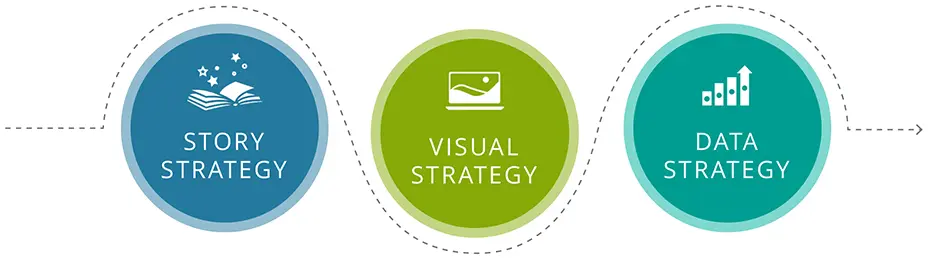
Build a tailored visual story strategy

Develop a visual approach that accounts for your audience’s unique characteristics, how they think, and what they need to see to ensure every visual choice is intentional.

Map the narrative and visual flow

Map the narrative and visual flow

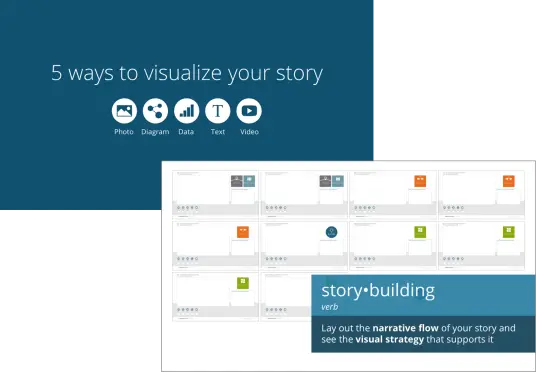
Lay out how your story and visuals work together before a single slide gets built, saving time and getting everyone on the same page quickly.

Maximize visual impact

Pressure test your story

Use guided coaching prompts to ensure your headlines and visuals are working hard before they reach key stakeholders.

Jumpstart design thinking

Maximize your visual impact

Apply basic design principles to transform text-heavy or data-dense slides into clear, compelling visuals that inspire action.

Pressure test every story

Jumpstart your design thinking

Draw on real-world examples and visual inspiration to make creative, purposeful design decisions with confidence.

What to expect

This isn’t a passive learning experience. To get the most out of this course, come prepared with a completed Story Planner or 5 to 10 slides from a deck you’re currently working on. You’ll have the opportunity to map out your story or give your existing presentation a visual makeover, applying everything you learn to real work that matters to your career.

The Influencing with Visuals digital course runs across nine modules and takes approximately 3 to 5 hours to complete. We recommend finishing it within two weeks to keep momentum, but it’s fully flexible so go at whatever pace works for you.

You’ll learn from senior instructors with decades of real-world experience working with Fortune 500 companies. You’ll also hear from Hope and Cole, our AI teaching assistants, who bring a fresh voice to select modules.

When you finish, you’ll earn your Visual Communicator digital badge to showcase on LinkedIn.

Certified VC

What’s included

example slides
  • Bite-sized instructional videos featuring real-world examples and practical demonstrations
  • A practical visual storytelling toolkit, which includes hands-on tools like the Visual StoryBuilder™, VisualCoach™, and more
  • The Visual Story Library, a suite of 100+ beautifully designed slides that guide you through the storytelling signposts and provide inspiration, pro-tips, and coaching examples to jumpstart your design thinking
  • Hands-on activities that help you apply visual strategy concepts to your own presentations
  • Coaching moments sprinkled throughout to help you maintain a story first, visuals second mindset and pressure test your visual choices
  • An interactive Story Lab where you’ll apply everything you’ve learned and share your work with peers for valuable feedback

What our participants say

“This course gave me the confidence to present to senior leadership. I finally understand how to make my slides work for my story instead of against it.”

“The Visual Story Library alone is worth the investment. It’s like having a design coach right there with you as you build your presentation.”

“I used to dread building presentations. Now I have a repeatable process that saves me time and makes my communications significantly more effective.”

Get Started

Ready to bring your visual storytelling skills to the next level? Enroll in Influencing with Visuals and continue your storytelling journey today!

Please note: Crafting Strategic Visual Stories is a prerequisite for this course. The good news? You can bundle both courses together and save.

visual storytelling

FAQs

Is Crafting Strategic Visual Stories really a prerequisite?

Yes. Influencing with Visuals builds directly on the narrative framework and concepts introduced in Crafting Strategic Visual Stories, so a solid story foundation is essential to getting the most out of your visual strategy training. 

I've already completed Crafting Strategic Visual Stories. Can I enroll in Influencing with Visuals on its own?

Absolutely! Reach out to us at inquiries@tpc.ngagedev.com and we’ll help you get started.

What should I expect during checkout?

To enroll in Influencing with Visualsyou’ll need to create a Eurekos account before checkout. You’ll receive guided messages along the way, including your payment receipt and a course welcome.

How do I best prepare for the course?

Come prepared with a completed Story Planner or 5 to 10 slides from a deck you’re currently working on. You’ll have the opportunity to map out your story or give your existing presentation a visual makeover.

Which presentation software does this course support?

This course will show you how to efficiently build visual stories in Microsoft PowerPoint and Google Slides. No matter which you use (or if you dabble in both), we’ve got you covered.

Does my time zone matter?

This course is 100% online and self-paced, so you can take it from any time zone, anywhere in the world.

What are the technical requirements for accessing my course?

This course is hosted on Eurekos, our learning platform. Eurekos works well on any modern browser, including the latest versions of Google Chrome, Mozilla Firefox, Safari, and Microsoft Edge. It has no specific computer or OS requirements and is fully compatible with mobile devices.

How do I earn my Visual Communicator badge?

Complete the course and pass a short quiz to earn your Visual Communicator digital badge to showcase on LinkedIn.

What if I'd like to enroll my team?

We offer instructor-led and virtual instructor-led workshops for teams. Email us at inquiries@tpc.ngagedev.com to learn more.

What is the refund policy?

No refund will be issued after 7 days from the date of purchase or if the course link has been activated. A 20% restocking fee will be charged on all refund requests within 7 days of the purchase date and prior to activation of the course link. The restocking fee will be subtracted from the refund amount.

Key Takeaways