THIS IS A DEVELOPMENT WEBSITE
visual data presentation
For Individuals

Presenting Data Visually

Visual data presentation course that transforms numbers into narratives.

 Get started 

Turn your data into stories that drive action

Ever found yourself drowning in spreadsheets, wondering how to make your audience care about your data? You’re not alone. Most professionals have critical insights to share, but too often we jump straight to building charts without first establishing why our audience should care. The result? People struggle to decode the information, decision-makers lose interest, and valuable insights go unrecognized.

The problem isn’t the data. It’s the approach. Without a clear narrative driving your data choices, even the most powerful numbers can fall flat.

Presenting Data Visually introduces a proven data strategy that helps you move from data dump to data fluency. Whether you’re a data expert or an occasional presenter, get the skills to craft compelling data stories that serve your audience and drive the decisions that matter.

The real cost of a data dump

Without a clear data strategy, the consequences add up:

Data overload stalls decision-making. When you present too much information without clear insights or recommendations, your audience is left to draw their own conclusions.

You report the news instead of driving action. Without a clear point of view, your data becomes a dump of facts rather than a strategic narrative that influences outcomes.

Follow-up meetings and rework cycles drain productivity. When data presentations lack clarity, you waste time re-explaining findings instead of moving work forward.

Your technical expertise doesn’t translate to business impact. Knowing complex data inside and out doesn’t automatically mean your audience will understand or act on it.

Your credibility takes a hit. When stakeholders can’t quickly grasp your point, your valuable work gets overshadowed by the confusion your data creates.


visual data presentation

The case for data storytelling

Whether we’re aiming to influence a decision, propose a new initiative, or report on performance, we rely on data. But data on its own is not an idea. There’s usually more data than there is clarity and, instead of supporting our message, we force our audience to decode it and draw their own conclusions.

At its core, great visual data presentation is rooted in storytelling. Whether you’re a data expert struggling to influence leadership or an occasional data presenter who wants to make every number count, data storytelling ensures your insights drive the business conversations that matter.

You’ll learn how to

visual story strategy

Humanize your data

Identify exactly what your audience needs to know or do with data and distill numbers into meaningful insights.

Map the narrative and visual flow

Apply a proven data strategy

Transform your cluttered charts and tables into concise, compelling data visualizations that are easy to scan, digest, and act on.

Maximize visual impact

Think outside the chart

Go beyond the typical bar or pie chart and use creative visual techniques to present your data in ways that resonate and stick.

Jumpstart design thinking

Use clever design techniques

Apply color, size, and shape to highlight key information and make your data easy to interpret at a glance.

Pressure test every story

Tell a complete data story

Wrap your data in a story that elevates insights and gives stakeholders a clear path forward.

What to expect

This isn’t a passive learning experience. To get the most out of this course, come prepared with one or two data-rich slides you’re currently working on. You’ll have the opportunity to rework them using our visual data presentation tools and techniques, applying everything you learn to real work that matters to your career.

The Presenting Data Visually digital course runs across seven modules and takes approximately 3 to 5 hours to complete. We recommend finishing it within two weeks to keep momentum, but it’s fully flexible so go at whatever pace works for you. We suggest allowing extra time to practice and apply the exercises as you go.

You’ll learn from senior instructors with decades of real-world experience working with Fortune 500 companies.

When you finish, you’ll earn your Certified Data Communicator digital badge to showcase on LinkedIn.

Certified Data Communicator

What’s included

  • Bite-sized instructional videos featuring real-world examples and practical demonstrations
  • A practical data storytelling toolkit, which includes hands-on tools like DataCoach™, DataCheck™, and more
  • The Data Visualization Library, a suite of 100+ professionally designed data visualizations that guide you through the five ways to display data and provide inspiration, pro-tips, and coaching examples
  • Hands-on activities that help you apply data visualization concepts to your own presentations
  • Coaching moments sprinkled throughout to help you pressure test your data choices and ensure every visualization serves your story

The transformation is real

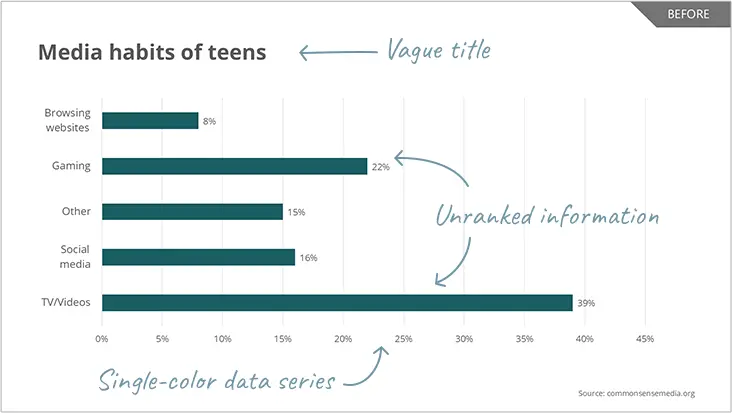
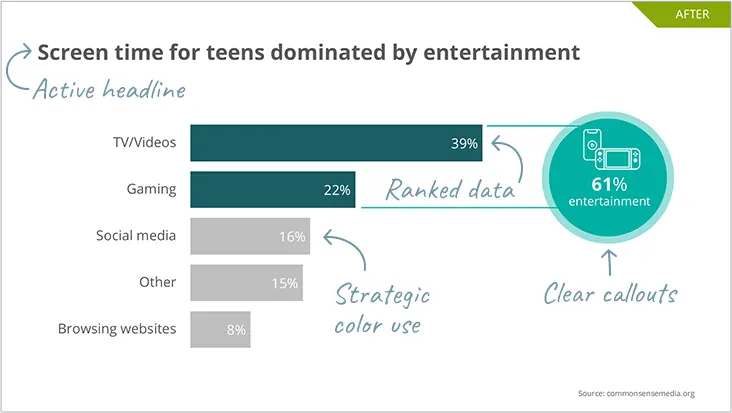
The difference between a data dump and a data story speaks for itself. Here’s a real example.

Before slide

Before: Vague titles, single-color data series, and unranked information leave audiences confused and struggling to find insights

After Slide

After: Active headlines, strategic color use, ranked data, and clear callouts make your key points instantly visible

What our participants say

“This class was a game-changer. Now I wish I could get back those years I wasted building lackluster charts in PowerPoint!”

“Very practical tips and resources that will save me time when trying to visualize the insights that we’re getting from data.”

This is one of those courses you don’t come across often. The content can be utilized in your day-to-day work instantly and effectively.”

Get Started

Ready to turn numbers into narratives? Enroll in Presenting Data Visually today!

6-month course access: $599 USD

Want to build the complete storytelling skill set? Bundle Presenting Data Visually with our other on-demand courses at a discounted rate. Explore Bundles ›

Presenting Data Visually

FAQs

What should I expect during checkout?

To enroll in Presenting Data Visuallyyou’ll need to create a Eurekos account before checkout. You’ll receive guided messages along the way, including your payment receipt and a course welcome.

How do I best prepare for the course?

Come prepared with one or two data-rich slides you’re currently working on. You’ll have the opportunity to rework them using our data visualization tools and techniques.

Which presentation software does this course support?

This course will show you how to efficiently build data visualizations in both Microsoft PowerPoint and Google Slides. No matter which you use (or if you dabble in both), we’ve got you covered.

Does my time zone matter?

This course is 100% online and self-paced, so you can take it from any time zone, anywhere in the world.

What are the technical requirements for accessing my course?

This course is hosted on Eurekos, our learning platform. Eurekos works well on any modern browser, including the latest versions of Google Chrome, Mozilla Firefox, Safari, and Microsoft Edge. It has no specific computer or OS requirements and is fully compatible with mobile devices.

How do I earn my Certified Data Communicator badge?

Complete the course and pass a short quiz to earn your Certified Data Communicator digital badge to showcase on LinkedIn.

What if I'd like to enroll my team?

We offer instructor-led and virtual instructor-led workshops for teams. Email us at inquiries@tpc.ngagedev.com to learn more.

What is the refund policy?

No refund will be issued after 7 days from the date of purchase or if the course link has been activated. A 20% restocking fee will be charged on all refund requests within 7 days of the purchase date and prior to activation of the course link. The restocking fee will be subtracted from the refund amount.

Key Takeaways